

當工程師開始設計 Generative UI 時,第一個直覺反應通常是:「前端 DOM 本來就是一棵巢狀樹,那我們就讓 LLM 直接輸出深層巢狀的 JSON 吧!」
例如寫成這樣:
{
  "component": "Card",
  "children": [
    {
      "component": "Grid",
      "children": [
        { "component": "Metric", "props": { "val": 100 } }
      ]
    }
  ]
}
這個結構看起來非常符合 JSX 的直覺,但在生產環境的串流(Streaming)與容錯渲染場景中,它會帶來毀滅性的災難:
[ { "children": [ { ...),前端 JSON.parse 會直接 SyntaxError 崩潰,無法局部繪製。children[0].children[2]...)。今天我們就要徹底解構 json-render 的靈魂設計——Flat Element Tree(扁平元素樹)。
json-render 的資料結構規範極其單純且嚴格:頂層永遠只有兩個欄位——root 與 elements。
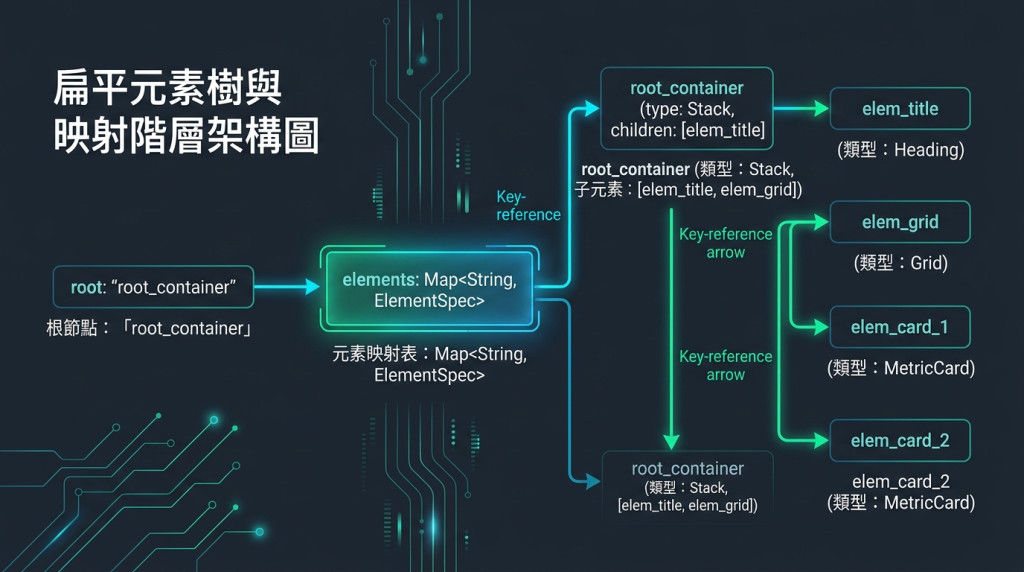
三大鐵律:
root 與 elements:root 是進入點的 Key 字串,elements 是一個攤平的 Map。children 永遠是 Key 字串陣列:絕不直接內嵌物件,只存放子元件的唯一識別碼(如 ["child_a", "child_b"])。type(型別)、props(屬性鍵值對)、children(子節點清單)。在扁平 Map 結構下,每個元件都擁有唯一的 ID(Key):
replace /elements/elem_card_1/props/val 200。elements[key] 以 $O(1)$ 時間複雜度精確定位並更新該元件,底層 React 只需重新渲染該特定節點,徹底杜絕整頁 Re-mount。在串流接收過程中,如果父節點 root_container 的 children 宣告了 ["c1", "c2"],但 c2 的 JSON 還沒傳輸完畢:
children.map(id => elements[id]).filter(Boolean)。c1 可以立即渲染在畫面上,c2 自動被略過或顯示骨架屏(Skeleton),等下一秒傳輸完成時自然掛載!以下提供:
DashboardSpecBuilder
package com.antechinus.travel.spec;

import java.util.*;

/**
 * 儀表板規格流式建構器 (Fluent Builder)
 * 協助開發者與 Action 快速、安全地組裝標準扁平 Element Tree
 */
public class DashboardSpecBuilder {

    private String rootKey;
    private final Map<String, DashboardSpec.ElementSpec> elements = new LinkedHashMap<>();

    private DashboardSpecBuilder(String rootKey) {
        this.rootKey = rootKey;
    }

    /**
     * 建立 Builder 實例並指定 Root Key
     */
    public static DashboardSpecBuilder create(String rootKey) {
        return new DashboardSpecBuilder(rootKey);
    }

    /**
     * 新增一個 UI 元件節點
     *
     * @param key 元件唯一識別碼
     * @param type 元件型別 (如 Stack, MetricCard)
     * @param props 元件屬性 Map
     * @param children 子節點 Key 清單
     */
    public DashboardSpecBuilder addElement(String key, String type, Map<String, Object> props, List<String> children) {
        elements.put(key, new DashboardSpec.ElementSpec(type, props != null ? props : Map.of(), children != null ? children : List.of()));
        return this;
    }

    /**
     * 新增一個無子節點的葉子元件
     */
    public DashboardSpecBuilder addLeaf(String key, String type, Map<String, Object> props) {
        return addElement(key, type, props, List.of());
    }

    /**
     * 建構並驗證 DashboardSpec
     */
    public DashboardSpec build() {
        if (!elements.containsKey(rootKey)) {
            throw new IllegalStateException("Root key [" + rootKey + "] 不存在於 elements 中!");
        }
        return new DashboardSpec(rootKey, Collections.unmodifiableMap(elements));
    }
}
// src/components/renderer/FlatTreeRenderer.tsx
import React from 'react';
import { dashboardRegistry } from '../dashboard/dashboardCatalog';

export interface ElementSpec {
  type: string;
  props: Record<string, any>;
  children: string[];
}

export interface DashboardSpec {
  root: string;
  elements: Record<string, ElementSpec>;
}

interface FlatTreeRendererProps {
  spec: DashboardSpec;
}

/**
 * 扁平元素樹渲染器
 * 依據 root Key 開始進行遞迴查找與 Native Component 映射
 */
export const FlatTreeRenderer: React.FC<FlatTreeRendererProps> = ({ spec }) => {
  const { root, elements } = spec;

  if (!root || !elements || !elements[root]) {
    return <div className="text-slate-500 text-sm p-4">等待規格載入中...</div>;
  }

  /**
   * 內部遞迴節點渲染函式
   */
  const renderNode = (nodeKey: string): React.ReactNode => {
    const element = elements[nodeKey];

    // 容錯防護:若子節點尚未在串流中傳輸抵達,安全略過
    if (!element) {
      return null;
    }

    const Component = dashboardRegistry[element.type];

    // 容錯防護:若遇到未註冊的未知元件,渲染 Fallback
    if (!Component) {
      return (
        <div key={nodeKey} className="p-2 border border-dashed border-red-500 text-xs text-red-400">
          [未知元件: {element.type}]
        </div>
      );
    }

    // 遞迴解析子節點
    const renderedChildren = (element.children || [])
      .map((childKey) => renderNode(childKey))
      .filter(Boolean);

    return (
      <Component key={nodeKey} {...element.props}>
        {renderedChildren.length > 0 ? renderedChildren : undefined}
      </Component>
    );
  };

  return <div className="dashboard-container w-full">{renderNode(root)}</div>;
};
children 陣列中混雜內嵌物件
children: [ { type: "MetricCard" } ],破壞了 Flat 契約,前端解析器報 TypeError: childKey.startsWith is not a function。children 的型別必須嚴格限定為 List<String>(TypeScript 為 string[]),絕不可接受 Object。children: ["chart_1"],但 elements Map 裡根本沒有 "chart_1" 這個 Key。filter(Boolean) 進行安全防禦;後端在 build() 時可加入檢查邏輯。"card_1" 作為 Key,導致後寫入的覆蓋了先寫入的元件。metric_revenue_2026)或自動加上 UUID 字尾(如 card_ + nanoId())。| 評估項目 | ❌ 深層巢狀結構 (Nested JSX) | ✅ 扁平元素樹 (Flat Spec) |
|---|---|---|
| 頂層資料格式 | 多層 { component, children: [{...}] } |
僅有 { root: string, elements: Map } |
| 串流增量更新 | 必須重新遍歷整棵樹尋找節點 | 直接透過 elements[key] 進行 $O(1)$ 精確更新 |
| 半截 JSON 容錯 | 語法解析直接拋出例外中斷渲染 | 只要已抵達的節點即可立即渲染,其餘靜默等待 |
| React 渲染效能 | 頻繁引發整頁 Re-mount | 精確局部更新,保持子元件 Focus 與動畫狀態 |
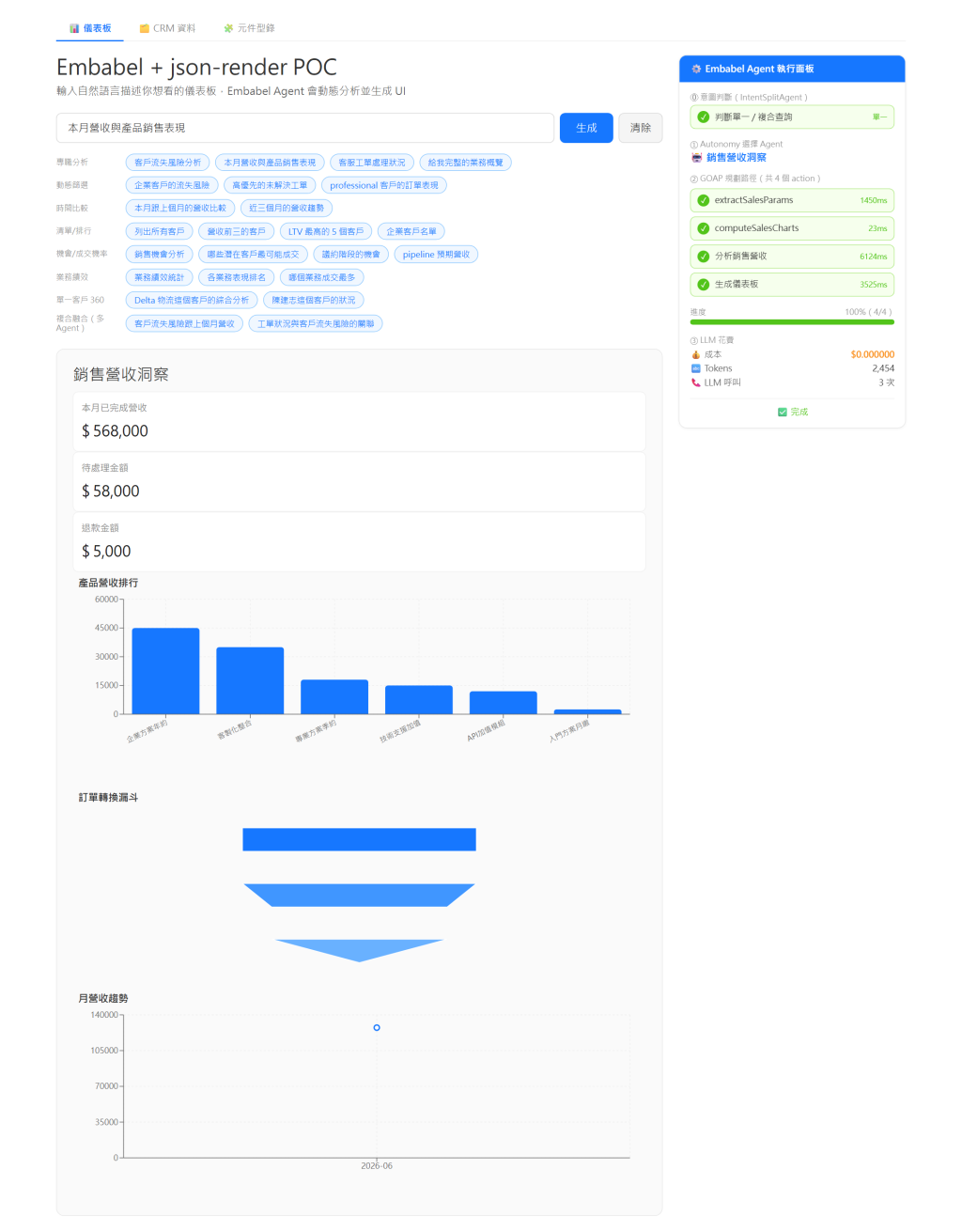
下圖為實作系統輸入「本月營收與產品銷售表現」後的結果:後端回傳的正是 root + elements map 的扁平 spec,前端 Renderer 依 key 引用組出指標卡、長條圖、漏斗圖與折線圖;右側面板同時顯示這份 spec 是經由 4 個 GOAP action 產生的。
DashboardSpecBuilder 建立一個包含 Stack(垂直佈局)、Heading(標題)、與兩個 MetricCard(消費、旅次)的 Spec 物件。FlatTreeRenderer,驗證是否能正常渲染出卡片。children 陣列順序,而不需要動任何子元件的資料?


 iThome鐵人賽
 看影片追技術